ESP32 BLE Sync
Direct, paired Bluetooth LE link to the ESP32. Versioned protocol with acknowledged commands: the app always shows the dryer's real state.
ESP32 · Bluetooth LE · iPhone
SpoolDry connects your filament dryer to your iPhone using Bluetooth. Watch temperature and humidity live, start drying with engineering-polymer profiles and follow the timer on your Lock Screen. No account. No cloud.
No subscription. One-time purchase. · Coming to the App Store

Direct, paired Bluetooth LE link to the ESP32. Versioned protocol with acknowledged commands: the app always shows the dryer's real state.
PLA to PEEK, PA-CF and PPS: typical starting guidance with manufacturer sources, never presented as an official requirement.
Lock Screen and Dynamic Island show filament, target, current temperature, humidity and remaining time, straight from the device.
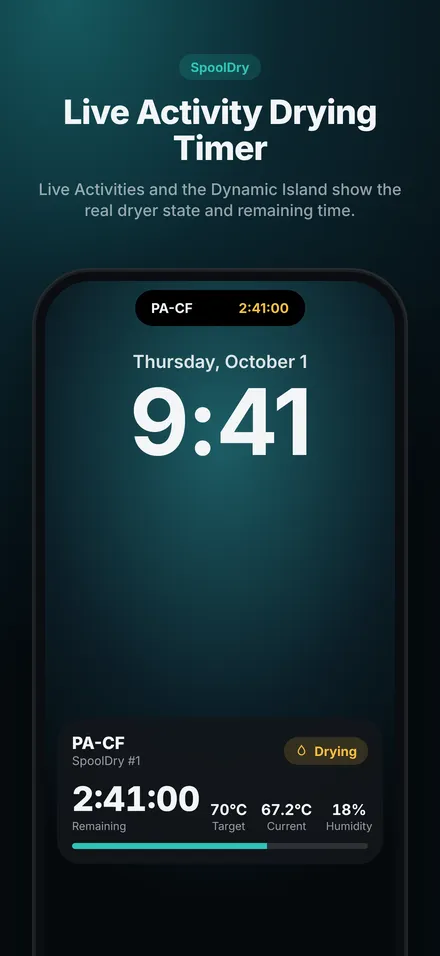
No account, no server, no internet. Everything stays between your iPhone and your dryer.
Sensirion SHT40 accuracy with live charts.
Built-in guidance plus your own brand profiles.
Start/end humidity, average temperature, charts and statistics.
Firmware limits, watchdog, fan tach, relay, thermostat and thermal fuse.
Name and switch between SpoolDry #1, #2 and more.
Pay once. Every future improvement included.
Build the dryer or flash the firmware to your ESP32-C6.
Pair it with SpoolDry over Bluetooth in seconds.
Pick a filament profile and start drying. Follow it on your Lock Screen.
A low-voltage (24 V DC) architecture: all mains voltage stays inside a certified, enclosed power adapter. The chamber is limited to 70 °C by the fan rating; independent hardware protects against software faults.
| Component | Selected part | Purpose | Qty | Example links |
|---|---|---|---|---|
| ESP32 | Espressif ESP32-C6-DevKitC-1-N8 | Controller: BLE link, sensors, control loop and all firmware safety logic. | 1 | DigiKey · Adafruit |
| Temperature/humidity sensor | Sensirion SHT40 breakout (Adafruit #4885) | Measures chamber temperature and relative humidity. | 1 | Adafruit · DigiKey |
| PTC heater | Insulated PTC air heater 24 V / 100 W | Heats the air that the fan blows through the chamber. | 1 | Amazon (Bestol 24V 100W) · VXB |
| Fan | San Ace 80 9GA0824P4G001 (24 V, tach) | Moves air through the PTC heater and around the spools; removes moist air. | 1 | Sanyo Denki · Mouser (9GA0824P4 series) |
| MOSFET | Infineon IRLB8721PBF logic-level N-MOSFET | Low-side switches for heater PWM (Q1), fan (Q2) and relay coil (Q3). | 3 | Adafruit #355 · Mouser |
| Safety relay | Omron G5LE-1A4 DC24 relay (K1) | Second, independent heater switch in series with the MOSFET. | 1 | DigiKey · Omron datasheet |
| Thermostat 85 °C | Cantherm F20A08505ACFA06E thermostat (TS1) | Independent hardware over-temperature protection for the chamber. | 1 | DigiKey · Cantherm F20 series |
| Thermal fuse 100 °C | Cantherm SDF-DF100S thermal cutoff (TCO) | Last-resort, non-resettable fuse in the heater current path. | 1 | DigiKey |
| Heater NTC | Semitec 104GT-2 NTC thermistor + 47 kΩ 1 % resistor | Measures heater-outlet temperature for derating and fault detection. | 1 | Mouser |
| Power supply | Mean Well GST220A24-R7B desktop adapter | Powers everything from 24 V DC. All mains voltage stays inside this certified adapter. | 1 | Mouser · Newark |
| Power connector | Kycon KPJX-PM-4S panel jack (mates with R7B plug) | Locking 24 V input on the controller box. | 1 | DigiKey · Kycon datasheet |
| Fuse | ATO blade fuse 7.5 A + Littelfuse inline holder | Protects wiring from short circuits. | 1 | Littelfuse 0FHA0002XP (Amazon) · Keystone 3557-2 PCB holder |
| 5 V regulator | Pololu D24V10F5 step-down regulator | Feeds the ESP32 board's 5 V pin from 24 V. | 1 | Pololu |
| Wires, terminals, passives | Small parts | Assembly, connectors and passive components. | 1 | Adafruit Perma-Proto (Pololu) · Phoenix 1935161 (DigiKey) |
| Enclosure | Hammond 1591XXDSBK ABS enclosure + insulated dry box | Keeps electronics cool and away from the heated chamber. | 1 | Hammond 1591XX |
Links are examples verified during research (October 2026); availability changes. Equivalent parts with the same ratings work.
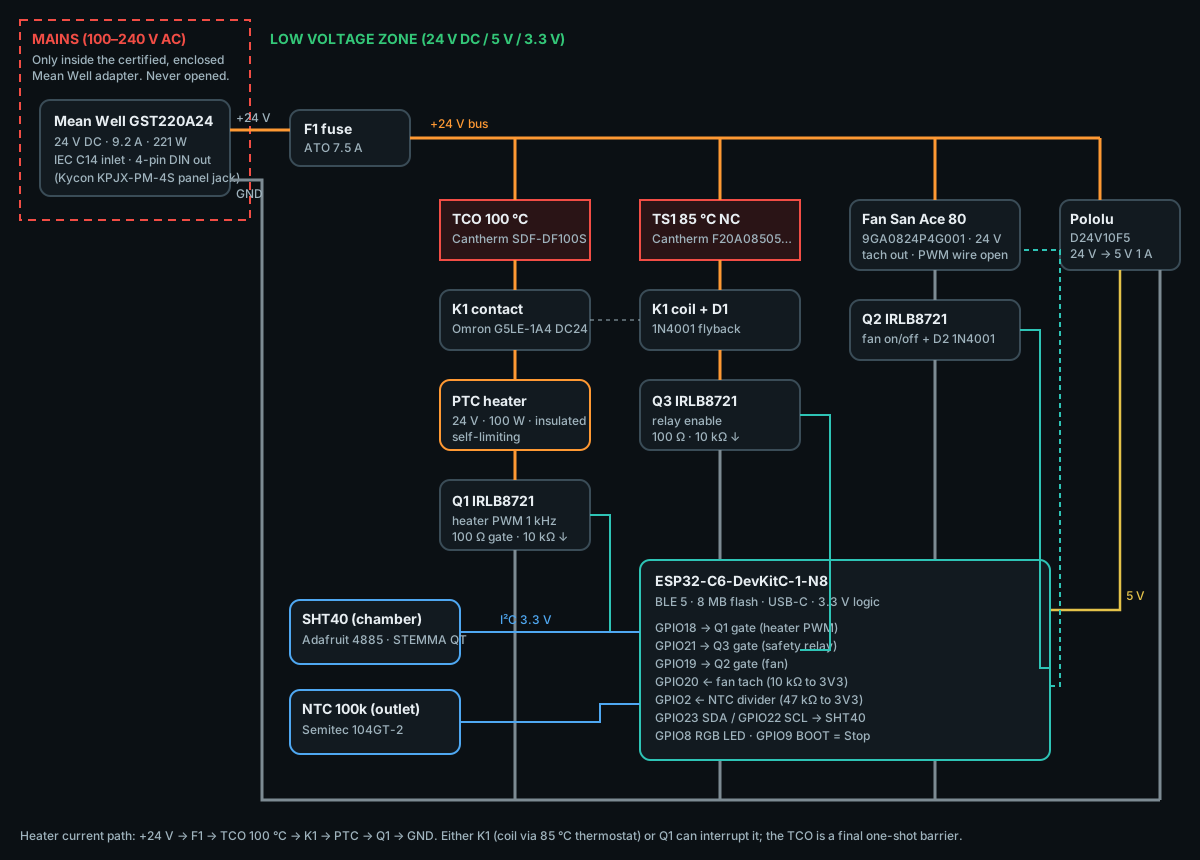
| GPIO | Function | Component | Dir | Notes |
|---|---|---|---|---|
GPIO23 | I²C SDA | SHT40 | I/O | Arduino default SDA on ESP32-C6 |
GPIO22 | I²C SCL | SHT40 | Out | 100 kHz, 25 ms timeout, bus recovery |
GPIO18 | Heater PWM | Q1 gate (100 Ω, 10 kΩ pull-down) | Out | LEDC 1 kHz, 10-bit, soft-start |
GPIO21 | Heater enable | Q3 gate → relay K1 coil | Out | HIGH only while PREHEATING/DRYING |
GPIO19 | Fan enable | Q2 gate (100 Ω, 10 kΩ pull-down) | Out | Forced ON whenever heating |
GPIO20 | Fan tach | San Ace pulse sensor | In | 10 kΩ pull-up to 3V3, 2 pulses/rev |
GPIO2 | Heater NTC (ADC1_CH2) | 104GT-2 + 47 kΩ to 3V3 | In | 12 dB attenuation, 8-sample average |
GPIO8 | Status LED | On-board RGB LED | Out | Strapping pin; LED only |
GPIO9 | Local button | On-board BOOT button | In | Short: stop · 3 s: reset fault · 10 s: clear bonds |
5V / GND | Power | Pololu D24V10F5 output | — | Do not also power from USB while on 24 V without care |
ESP32-C6-DevKitC-1-N8 · USB-C data cable · SHT40 + STEMMA QT cable
(full dryer: see the Bill of Materials above)# Arduino IDE 2.x: https://www.arduino.cc/en/software
# or PlatformIO Core:
python3 -m pip install -U platformio# Arduino IDE → Settings → Additional boards manager URLs:
https://espressif.github.io/arduino-esp32/package_esp32_index.json
# Boards Manager → install "esp32 by Espressif Systems" ≥ 3.3.12
# arduino-cli
arduino-cli core update-index --additional-urls https://espressif.github.io/arduino-esp32/package_esp32_index.json
arduino-cli core install esp32:esp32# Use the USB-C port labelled "UART" on the DevKitC-1.
# Unplug the 24 V supply while flashing from your computer.# Arduino IDE: Tools → Board → esp32 → "ESP32C6 Dev Module"
# Flash Size: 8MB · Partition Scheme: Custom (uses SpoolDry/partitions.csv)
# PlatformIO: board = esp32-c6-devkitc-1 (already in platformio.ini)# macOS: /dev/cu.usbserial-* · Linux: /dev/ttyUSB0 · Windows: COM3
arduino-cli board list# Library Manager → "NimBLE-Arduino" by h2zero ≥ 2.5.1
arduino-cli lib install "NimBLE-Arduino@2.5.1"
# PlatformIO installs it automatically (lib_deps)cd esp32
pio run
# or
arduino-cli compile --fqbn esp32:esp32:esp32c6:FlashSize=8M,PartitionScheme=custom SpoolDrypio run -t upload
# or
arduino-cli upload -p /dev/ttyUSB0 --fqbn esp32:esp32:esp32c6:FlashSize=8M,PartitionScheme=custom SpoolDrypio device monitor -b 115200
# expected:
SpoolDry firmware 1.0.0 (BLE protocol v1) ready as "SpoolDry-A1B2"
Advertising SpoolDry service 5D0F0001-2B7E-4C8A-9B1E-53504F4F4C44# Any BLE scanner (e.g. nRF Connect) must show "SpoolDry-XXXX"
# advertising service 5D0F0001-2B7E-4C8A-9B1E-53504F4F4C44# SpoolDry → Device → Add Dryer (Bluetooth permission prompt appears)# Tap "SpoolDry-XXXX" → accept the iOS pairing request
# New phones can pair within 5 min after power-on
# (or hold BOOT for 10 s to clear bonds and reopen pairing)SpoolDry/src/core/Config.h (pins, limits)SpoolDry/partitions.csv (2× 3 MB OTA slots)make -C test/host test (33 safety & protocol tests)5D0F0001-2B7E-4C8A-9B1E-53504F4F4C44Typical starting guidance compiled from official manufacturer pages, not a universal requirement. Always follow your filament's data sheet. SpoolDry hardware v1 reaches 70 °C.
| Material | Typical temperature | Typical time | SpoolDry start | Sources |
|---|---|---|---|---|
| PLA | 45–60 °C | 4–8 h | 50 °C · 6 h · <20% RH | Bambu Lab: 50–60 °C · 8 h (blast oven) Prusa Research: 45 °C · 6 h Fiberlogy: 50 °C · 4 h 3DXTECH: 45 °C · 4 h |
| PETG | 55–70 °C | 4–8 h | 65 °C · 6 h · <20% RH | Bambu Lab: 60–70 °C · 8 h (blast oven) Prusa Research: 55 °C · 6 h Fiberlogy: 60 °C · 4 h 3DXTECH: 65 °C · 4 h |
| ABS | 60–85 °C | 4–8 h | 70 °C · 6 h · <20% RH | Bambu Lab: 75–85 °C · 8 h (blast oven) Fiberlogy: 60 °C · 4 h 3DXTECH: 80 °C · 4 h |
| ASA | 65–85 °C | 4–8 h | 70 °C · 6 h · <20% RH | Bambu Lab: 75–85 °C · 8 h (blast oven) Prusa Research: 80 °C · 4 h Fiberlogy: 80 °C · 4 h 3DXTECH: 80 °C · 4 h |
| TPU | 50–75 °C | 4–8 h | 60 °C · 6 h · <15% RH | Bambu Lab: 65–75 °C · 8 h (blast oven) Prusa Research: 60 °C · 4–6 h 3DXTECH: 65 °C · 4 h |
| PA (Nylon) | 70–90 °C | 4–12 h | 70 °C · 12 h · <10% RH | Bambu Lab: 75–85 °C · 8–12 h (blast oven) Fiberlogy: 70 °C · 4 h 3DXTECH: 80 °C · 4 h / 90 °C · 4–6 h |
| PC | 70–90 °C | 4–8 h | 70 °C · 8 h · <15% RH | Polymaker: 70–80 °C · 6–8 h Bambu Lab: 75–85 °C · 8 h (blast oven) Prusa Research: 85 °C · 5 h 3DXTECH: 120 °C · 4 h+ |
| PVA | 55–85 °C | 4–12 h | 65 °C · 8 h · <15% RH | Raise3D: 80 °C · 8–12 h Bambu Lab: 75–85 °C · 8–12 h (blast oven) 3DXTECH: 65 °C · 4 h |
| BVOH | 50–85 °C | 4–12 h | 55 °C · 6 h · <15% RH | Fiberlogy: 50 °C · 4 h Bambu Lab: 75–85 °C · 8–12 h (blast oven) |
| PEEK 110–150 °C | 120–150 °C | 3–6 h | 70 °C · 6 h · <10% RH | 3DXTECH: 150 °C · 3 h |
| PEI / ULTEM 110–150 °C | 130–150 °C | 4–8 h | 70 °C · 6 h · <10% RH | 3DXTECH: 150 °C · 4–6 h / 130 °C · 4–6 h Prusa Research: 150 °C · 8 h |
| PPS 110–150 °C | 110–140 °C | 4–12 h | 70 °C · 6 h · <10% RH | Bambu Lab: 110–140 °C · 8–12 h (blast oven) 3DXTECH: 110 °C · 4 h |
| PA-CF | 70–100 °C | 4–12 h | 70 °C · 12 h · <10% RH | Bambu Lab: 75–85 °C · 8–12 h (blast oven) Prusa Research: 90 °C · 6 h Fiberlogy: 80 °C · 4 h 3DXTECH: 90 °C · 4 h |
| PA-GF 110–150 °C | 75–100 °C | 4–16 h | 70 °C · 12 h · <10% RH | Forward AM (BASF): 100 °C · 4–16 h Fiberlogy: 80 °C · 4 h 3DXTECH: 90 °C · 4 h Bambu Lab: 75–85 °C · 8–12 h (blast oven) |
| PETG-CF | 60–70 °C | 4–8 h | 65 °C · 6 h · <20% RH | Bambu Lab: 60–70 °C · 8 h (blast oven) 3DXTECH: 65 °C · 4 h |
| PLA-CF | 45–60 °C | 4–8 h | 50 °C · 6 h · <20% RH | Bambu Lab: 50–60 °C · 8 h (blast oven) |
| PC-CF 110–150 °C | 80–120 °C | 4–8 h | 70 °C · 10 h · <15% RH | Prusa Research: 90 °C · 4 h 3DXTECH: 120 °C · 4 h |
| ASA-CF | 65–85 °C | 4–8 h | 70 °C · 6 h · <20% RH | 3DXTECH: 80 °C · 4 h Bambu Lab: 75–85 °C · 8 h (blast oven) |
| PPS-CF 110–150 °C | 110–140 °C | 8–12 h | 70 °C · 6 h · <10% RH | Bambu Lab: 110–140 °C · 8–12 h (blast oven) |
0
3 complete drying sessions with every feature, one dryer.
$19.99
Unlimited sessions, multiple dryers, all future improvements. $19.99 in the US App Store; local prices are shown by the App Store.
No subscription. One-time purchase.